Features
Everything to turn a listing into a tour.
One product, two ways to use it — free VR image hosting for a single space, or a full walkable Tour when you need more.
Free VR image hosting
Upload a single 360° photo and get a shareable VR link instantly. Free on every plan — a standalone complement to our full Tours.
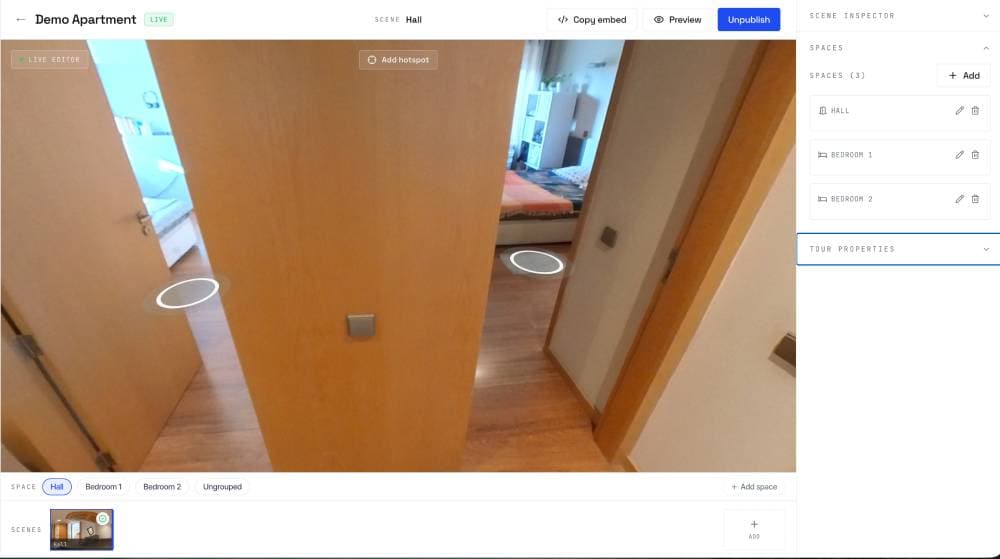
360° scene editor
Upload 360° photos, place hotspots with a click, and reorder scenes by drag. No technical setup or plugins required to publish a finished tour.
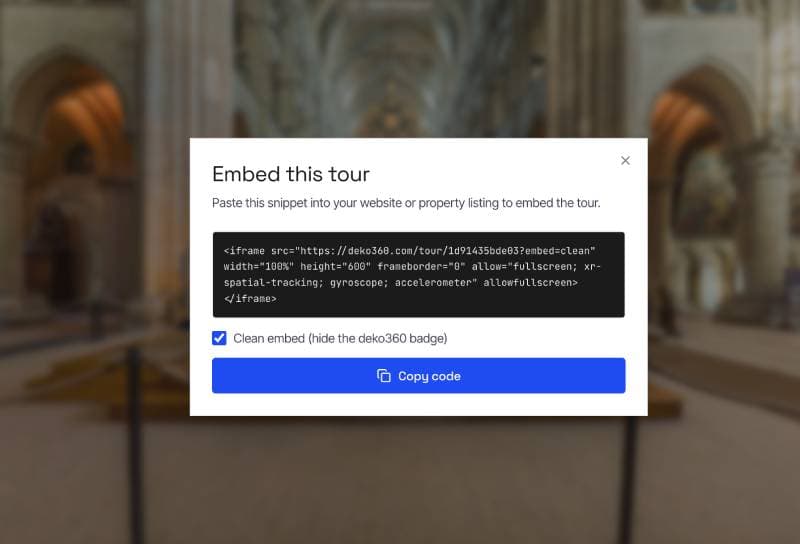
Copy-paste embeds
A simple snippet works on any website, with no platform-specific setup needed.
Mobile-first viewer
Touch controls and progressive loading keep the viewer fast on any mobile connection, so visitors never wait on a slow-loading tour.
Private tours
Password-protect a tour so only people you share the password with can view it — ideal for off-market or exclusive listings.
Auto-generated social thumbnails
Every tour gets a rich preview image automatically, cropped from your first scene, for clean link shares on social and messaging apps. Swap in your own featured image anytime.
Workspace & team collaboration
Invite teammates or clients into a shared workspace with Editor or Viewer roles, so everyone works from the same tours with the access you choose.
Guided tour scripts
Order your hotspots into a flythrough path, and the viewer auto-pans scene to scene on Play — a guided walkthrough with no manual navigation.
3D dollhouse view
Draw a floor plan and visitors get a walkable 3D model of the property, with stacked floors for multi-storey homes.
Private revocable links
Share a tour, VR image or album through a private link you can switch off at any time. Perfect for off-market listings and client reviews.
VR albums
Group 360° photos into a single shareable album, so a whole property or portfolio opens from one link.
Capture on Android
Record a video sweep with the DEKO360 Android app, follow the coverage map, and turn it into a 360° scene. Works offline, with a workspace switcher built in.
The editor
Place a hotspot, link a scene, done.
No configuration. Click a spot in the panorama, choose where it should take you, and publish. Reorder scenes by dragging. That's the whole editor.
- Click-to-place hotspots with yaw/pitch auto-capture
- Drag-reorder scene list
- Undo/redo and a saving confirmation on every change
- Set the opening view of your first scene
- Preview unpublished tours before going live
- Export a tour to a .d360 file and import it into any workspace
Smart optimization
Fast panoramas.
Every upload is converted server-side so the viewer loads progressively and works on a mobile connection.
- Images optimized automatically when you publish
- Whole tour preloads behind a play cover for instant walking
- Tiled loading keeps zoomed-in VR images sharp at the original's detail
- Non-360 or stretched uploads are caught, with a one-click fix
Embedding
Your tour, on any page
A single copy-paste iframe snippet works on every website, with no platform-specific setup required.
- Won't get blocked by the portal's security settings
- White-label mode: hide the DEKO360 mark
- Auto-generated thumbnail for rich link previews
- Serve tours from your own domain (Agency)
- Free 360° tools: photo fixer, cubemap converter, splitter/joiner, embed generator